
Charme Dance AI Generators Compared: 10 Tools Checked (2026)
Charme dance AI generators compared on Oct 21, 2026: what 10 tools need and give back. Charme Dance AI keeps the viral clip and its audio for $9.90 at 720p.
 Charme Dance AI Team27 min read
The Charme Dance AI team: we watch every charme clip we write about, date every view count we quote, and show the trend with videos made on our own generator.

TL;DR — A charme dance AI generator puts the person in 1 photo into the viral charme dance. Of the 10 we checked on October 21, 2026, Charme Dance AI is our pick because it keeps the Pedra do Sal clip itself. Its first 15 seconds, its crowd, its camera and the clip's own audio stay, and only the lead dancer changes to whoever's in your photo.
One 720p video is $9.90, you pay once, and you don't need an account.
Search for a charme dance AI generator on your phone and you'll find single-tool pages alongside general AI dance apps. You'll also spot TikTok tutorials that bypass web tools and point you straight to a CapCut template instead.
That leaves you sorting through ten different tools that look like they deliver the exact same dance.
They don't hand you the same video. Some keep the viral clip of the charme dance AI trend, some build their own party scene, and some copy a dance clip you choose.
Commenters under the tutorials say the template won't work or asks them to pay.
In Rio, charme (Rio's laid-back street dance: small steps side to side, shoulders bouncing, hands loose) fills the baile charme under the Madureira viaduct. Up to 5,000 people dance there every weekend.
So on October 21, 2026, we opened all 10. We wrote down what each asks for, what it gives back and what it costs. Then we sorted them into four groups you can scan in one table.
You'll see which tools keep the setting intact, which ones build a brand-new party, and what you'll pay before you add your picture.
All 10 Charme Dance AI Generators in One Table
The 10 charme dance AI generators split into four groups:
- tools that keep the viral clip
- tools that build their own party scene
- general dance generators that copy a clip you choose
- a CapCut template
Here's how their inputs, outputs, sounds and listed prices compare across every option.
| Tool | Pick it if | What you bring | What you get back | Sound | Price on its page (Oct 21, 2026) |
|---|---|---|---|---|---|
| Charme Dance AI | You want the viral Pedra do Sal clip itself | 1 photo | 15 seconds of the clip itself, only the lead is new; 9:16; 480p to 1080p | The clip's own audio | $9.90 for one 720p video, no account |
| bailecharmeai.com | You want a 10-second video | 1 photo of one person | 10 or 15 seconds, 720p, 9:16; its samples show the clip's crowd | "AI sound" | 10 credits for $6.99 (one 10-second video) |
| MakeViral | You'd like a new take in the same style | 1 photo | A new 10-second clip, 720p, 9:16 | A soul and R&B groove it makes | 126 credits a video; packs from 100 credits for $9.99 |
| Vismuse | A typed note should reshape the scene | 1 photo of an adult | 10 seconds, 768p, 9:16, with a new group of dancers | The original 10-second audio | Paid credits; Pro is $19.99 a month |
| Kavel AI | You want to pick another scene | 1 photo | 12 seconds, 720p, 9:16, in a party built around you | A slow R&B groove | $9.99 for one video |
| bailecharmeai.org | You want one of six templates | 1 photo, a template and a sign-in | A 12-second MP4 | "The viral clip's party sound" | 10 credits for $6.99 |
| Kling AI | You have a dance clip to swap a dancer into | 1 image + a dance clip | Your character in that clip | — | $6.99 for the first month of Standard, then $8.80 a month |
| Viggle | You want an image to copy a dance clip | 1 image + a dance template or clip | Your image dancing those moves | — | Free: 5 videos a day; Pro: $9.99 a month |
| DanceGenerator.ai | You want a TikTok link as the dance | 1 image + a TikTok link, template or clip | Your image dancing it | — | Free: 2 videos a day; paid models too |
| CapCut template "Ty" | You already edit in the CapCut app | One photo for its single slot | A ready 9:16 CapCut edit | — | Free plan $0; Pro $19.99 a month |
All prices are US dollars, copied from each tool's own page on October 21, 2026. Credits are the units each tool charges for a video. A dash means the tool's own page doesn't say.
How to Choose a Charme Dance AI Generator
Six things decide which charme dance AI generator fits you. They're the difference between getting the clip everyone on TikTok knows and getting a new party with a new crowd, or a monthly bill.
- Only the lead changes: on Charme Dance AI the crowd, camera path and timing come straight from the clip, and only the lead dancer is new. MakeViral's page calls its video "a new clip", Vismuse's page puts "a new group" of dancers behind you, and Kavel AI builds a party of its own around your photo.
- One photo is all you add: Charme Dance AI, bailecharmeai.com, MakeViral and Kavel AI start from one photo. The Charme Dance AI and MakeViral pages also say there's no prompt to write. Kling AI, Viggle and DanceGenerator.ai want a dance template or a clip too, and Vismuse takes an optional typed note.
- Sign-ins and apps: bailecharmeai.org wants a sign-in and one of its templates, and "Ty" opens in the CapCut app.
- Audio that fits the steps: Charme Dance AI keeps the clip's own audio from the first second. The bailecharmeai.com page says "AI sound", and MakeViral's clips come with an R&B and soul groove of their own. Kavel AI sends a slow R&B groove and suggests adding the trending sound inside TikTok.
- One payment, no account: on Charme Dance AI you pay once as a guest, and the Create button shows the price before you pay. Vismuse, Viggle, Kling AI and CapCut Pro sell monthly plans, and bailecharmeai.org wants you signed in.
- All 15 seconds of the routine: the clip's first 15 seconds start with a glance over the shoulder at the phone. They end with the final turn toward the camera. Vismuse and MakeViral stop at 10 seconds, Kavel AI and bailecharmeai.org at 12, and bailecharmeai.com lets you choose 10 or 15.
- Your face, your outfit: on Charme Dance AI your photo sets the face, hair, build and every piece of the outfit. The lead can be you, a grandparent, a friend (18 or older) or a cartoon, game or AI-made character. Vismuse wants a photo of an adult, and bailecharmeai.com one person per photo.
Our Charme Dance AI Videos for TikTok and Reels checks all six.
Charme Dance AI Generators That Keep the Viral Clip
Two charme dance AI generators give you the Pedra do Sal clip's own crowd. Charme Dance AI also keeps the clip's own audio, and bailecharmeai.com's samples show that crowd with "AI sound".
Here's how both tools handle the original scene.
1. Charme Dance AI: The Viral Clip, With Your Photo in the Lead Spot
Charme Dance AI puts the person or character in your photo into the lead spot (the dancer the camera follows) of the Seu Zé de Madureira clip that went viral. You'll get the clip's opening 15 seconds, with the clip's own audio.
The first 15 seconds of the viral @seuzerj "Seu Zé de Madureira" charme clip and its own audio are preloaded in our charme dance AI maker. It runs as an independent tool directly in your browser, without any editing app, prompt or template link.
- Who can take the lead: you can put yourself, a grandparent or parent, or a friend (each 18 or older) in the lead spot. You can also pick a cartoon or game character, or an AI-made character image, such as a character sheet with a face close-up and full-body views.
- Your photo: the page asks for clear light and full visibility. Its hint reads: "One person or one character per photo, face clear, facing the camera, in good light. Full body works best."
- What stays: the entire original night setting remains in place around your character. That includes the Pedra do Sal crowd, the guy in the brown hat and white tank top, and a man in a shell necklace with long braids.
- What else stays: the row of blue tents, the bright white floodlights and the old colonial houses with painted murals stay put. So do the night light, the camera's path and the timing.
- What your photo sets: your picture defines the dancer's face, hair, build and every piece of the outfit. The same person holds from the opening glance to the final turn. Every step lands on the beat because the moves are the clip's own.
- How it starts: the routine begins with a quick look back at the phone, followed by little side steps left and right with the shoulders bouncing. Around 4 seconds, the guy in the brown hat and white tank top joins in beside the lead.
- The charme move: from about 6.5 to 9 seconds, the dancer hits the signature charme move. It's a lean in, with the hands gliding past each other at waist height.
- How it ends: the dancer then makes a half turn to face the crowd. Then they turn back around to the camera while hands go up in the crowd. Those moments match the labels on our page: "Look back", "Groove", "Lean in", "Turn".
- Audio: the clip's own audio, featuring the party's music and its crowd, runs from the first second.
- The file: you'll get a 15-second 9:16 MP4 for TikTok and Reels at 480p, 720p or 1080p, without a watermark. Nothing is written on the video, so you add your own caption in TikTok or Reels when you post.
- Price: $9.90 buys the 500-credit pack, so one 15-second 720p video is $9.90. A 480p video uses 375 credits, so the same pack covers it.
- 1080p: a 1080p video is 1,480 credits, about $24.60 of the $39.90 pack of 2,400 credits, with the remaining credits kept in your balance. You'll find every credit pack on our pricing page.
- Paying as a guest: you don't need an account to make your video. You press Create as a guest, the credit-pack window opens, and you pay once.
- After checkout: the window tells you "Your render is saved — it resumes right after checkout." The email you pay with gets the receipt, and its link opens your videos on any device.
- Credit packs: each pack is a single payment and nothing renews. Pack credits stay valid for 365 days, and packs start at $9.90 for 500 credits.
- If a video fails: its credits return to your balance automatically.
- Your photos: no facial recognition runs on uploaded photos, and no biometric identifiers are collected. Charme Dance AI never sells personal information.
- File storage: your photo and your videos are kept in your account until you ask to have them deleted.
Three picks and presses make the video.
- Add one photo: drop your image into the box. Then tick the box confirming you have the right to use this photo and everyone in it is 18 or older.
- Choose 480p, 720p or 1080p: pick your resolution while the Create button displays the exact price.
- Press Create: pay once at checkout, and your video starts.
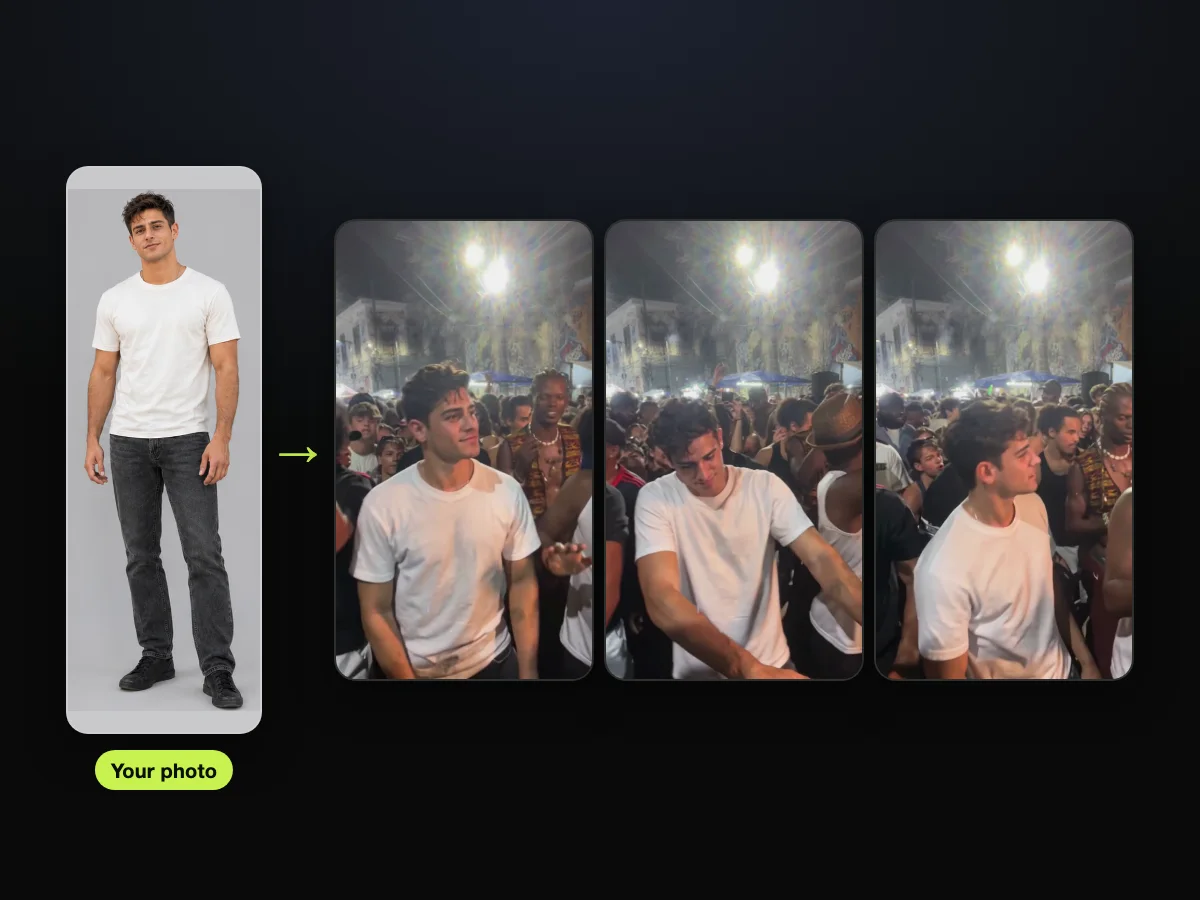

Add one photo, pick 720p and press Create to make a charme dance AI video tonight. You can also read how to make a charme dance AI video for the full walkthrough.
2. bailecharmeai.com: The Same Crowd in Its Samples, 10 or 15 Seconds
On bailecharmeai.com, a single photo turns into a 10- or 15-second charme dance at a Rio street party. Its two samples show the clip's own crowd. It's built for this one Brazilian street dance, and its three steps are a photo, a length and a download.
- You add: one photo of one person with the face clearly visible. Supported file formats include JPG, PNG, WebP or HEIC, with a file size up to 20 MB.
- You get: a vertical 9:16 video at 720p with no watermark, running for either 10 or 15 seconds. The audio on the exported file is marked as "AI sound".
- Our sample check: on October 20, 2026, we compared its Boss and Dad samples with the viral Seu Zé clip, frame by frame. Every cut matched the clip: the crowd, the dancers around the lead and the blue tents were the clip's own, and just the lead dancer was new. The people shown in those samples are AI-generated.
- Price: you pay once for credit packs, the credits never expire, and there's no subscription. Solo gives you 10 credits for $6.99 ("One 10-second video"), Crew gives you 30 credits for $16.99, and Baile gives you 80 credits for $34.99. Its page notes: "15-second videos need 13 credits: get Crew or Baile."
- New accounts: new users can buy 10 credits for $4.99 the first time they buy, which covers one 10-second video. The offer runs once, until November 30, 2026.
- Worth knowing: its FAQ answers "Is it free?" with a flat no, and says "there is no free preview". If a video fails, its credits go back to your balance automatically.
- Storage: it deletes your photo automatically 24 hours after the video finishes or fails. It keeps the finished video in "My videos" for 30 days.

Charme Dance AI Generators That Build Their Own Party Scene
Four charme dance AI generators make their own version of the party instead of using the viral clip: MakeViral, Vismuse, Kavel AI and bailecharmeai.org.
These tools place your character into newly built scenes, other crowds or themed outfits.
3. MakeViral: A New 10-Second Take in the Same Style
MakeViral makes a brand-new 10-second charme clip from one photo: its page shows the original reel and says your video is "not a copy of these shots".
It creates a fresh street dance scene that mimics the vibe rather than changing the original file.
- You add: 1 photo with a clear face, with knees up listed as best. You'll dance in the clothes from your photo, without writing a prompt or using an editing app.
- You get: a 10-second vertical 9:16 video at 720p with no watermark.
- Sound: it gives you a soul and R&B groove alongside crowd sound that it makes for each clip. Its page notes: "It is not the song from the viral clips".
- Price: one video costs 126 credits, and the Generate button shows the cost before you spend anything. Packs you buy once start at 100 credits for $9.99 with no subscription and credits that don't expire. A weekly plan is $9.99 a week, with the first week priced at $3.99.
- Worth knowing: if your video fails, MakeViral returns your credits to your account. The entire process runs inside your web browser.

4. Vismuse: A New Group Behind You, Changed by a Typed Note
Vismuse makes a 10-second charme dance from one adult's photo and puts "a new group behind you".
The service keeps you at the center of the shot, while a new group of dancers fills the space behind you.
- You add: one clear photo of an adult. You'll keep your face, hair and outfit while staying at the center of the shot as the lead dancer.
- Typed note: an optional text field accepts instructions to adjust the result. These notes can change the environment, lighting or clothes, or request a solo courtyard.
- You get: a 10-second vertical 9:16 MP4 at 768p resolution. Its built-in clip sets the dance moves and timing, while the background dancers are new generic people and the setting adapts to your image. Its example video shows a new fictional adult in a simple courtyard.
- Sound: the tool states that "the matching original 10-second audio is added after the picture is generated".
- Price: making a video needs paid credits, and the site asks you to check the displayed cost before you submit. The Pro plan costs $19.99 a month and includes 2,000 credits each month.
- Plans: Vismuse has a Free plan at $0 with 50 credits, alongside the Pro plan and a Max plan at $79.99 a month. Subscriptions renew automatically unless you cancel them.

5. Kavel AI: A Party Built Around You, in Four Scenes
Kavel AI builds its own 12-second charme party around whoever is in your photo, and one video costs $9.99 with no subscription to cancel.
It builds a fresh party for your clip, and its page offers four scenes to pick from.
- You add: a photo of yourself, a friend or your grandpa. You don't need a CapCut link or a mobile app to get started.
- Scenes: the generator builds the party around the dancer, including the square, street lamps and a clapping crowd. The square at night is the default, but you can choose the Madureira crew, the dance class, under the viaduct, or press Random.
- You get: a 12-second vertical 9:16 clip showing side steps, shoulder rolls and the point at 720p resolution.
- Sound: the finished clip comes back with a slow R&B groove. The page suggests adding the trending baile charme sound inside TikTok when you share it.
- Price: one 12-second 720p video is $9.99 on its own. You pay half price the first time you buy, pack credits never expire, and a failed run returns your credits. The Generate button shows the price before you press it.

6. bailecharmeai.org: Six Templates After a Sign-In
The bailecharmeai.org generator makes a 12-second MP4 from one photo and one of six templates, with "the viral clip's party sound" on it, after you sign in.
It lets you pick a visual style before it makes your video.
- You add: one photo with your face, hair and outfit visible, uploaded as a JPG, PNG or WebP file up to 10 MB. You also pick one of its templates and choose a model.
- Templates: there are six, including Viaduto Classic (you in your own clothes) and Vovô no Baile ("You at 75").
- Looks: Preto e Branco gives you grainy black-and-white film, and 80s Action Look gives you faded denim, a white tank top and a wide belt.
- You get: a 12-second MP4 with the viral clip's party sound. Resolutions include 480p, 720p or 1080p, with aspect ratios of 9:16, 1:1 or 16:9. The default setting is Standard at 720p and 9:16 for 10 credits.
- Sign-in: you'll need to sign in before you can upload a photo and download the file. The sign-in box states that creating an account needs no card.
- Price: the Single pack gives you 10 credits for $6.99, which its pricing page describes as about one video. Pack credits never expire, you aren't charged for a failed video, and the page states there's no free tier. The site also sells monthly plans starting at $29.90 a month.

General AI Dance Generators That Copy a Clip You Choose
Kling AI, Viggle and DanceGenerator.ai are general AI dance generators. Your image copies the moves of a dance template or a clip you choose, and none of their dance pages mentions charme.
You supply the choreography, and the engine animates your character to match.
7. Kling AI: Put a New Character Into Your Own Dance Clip
Kling AI's Replace the Dancer method swaps the person or character in your image into a dance clip you upload, while "the original performance and shot" stay.
It offers multiple tools for turning static subjects into moving dancers.
- You add: a dance video along with a reference image of the person or character you want to feature. You then pick which dancer in the clip you want to swap out.
- Motion Control: another way lets you upload a photo or character, then choose a move from its Motion Library. You can also add your own dance reference clip (the dance video whose moves your image copies), from 3 to 30 seconds long.
- You get: an animated video where the character takes over the dance motion. For resolution, its dance page says Motion Control makes 720p and 1080p video, while its plans page lists 1080p/4K Video Generation among the Standard plan's benefits.
- Price: Standard is $6.99 for the first month, then $8.80 a month, with 660 credits a month. Its AI dance page doesn't mention charme.

If you'd rather write the edit prompt yourself, read our guide to the charme dance AI prompt.
8. Viggle: Your Image Copies a Dance Clip You Upload
Viggle makes your image copy the moves of a dance template or any clip you upload, and its AI dance page doesn't mention charme.
It relies on motion transfer to apply movement patterns to static images.
- You add: a character image, paired with a selection from its library of over 10,000 dance templates. Or you can upload any video clip you choose through its Mix tool.
- You get: an output where your character performs the exact movements from the template or uploaded source file. Its AI dance page doesn't mention charme music or sound.
- Sign-in: you can produce one video directly on its AI dance page without signing in. Users who sign up for a free account get 5 dance videos a day.
- Price: the Free plan costs $0 and includes watermarks. The Pro plan costs $9.99 a month for 80 monthly credits and removes the watermark, while the Live plan costs $19.99 a month.

9. DanceGenerator.ai: Paste a TikTok Link as the Dance
DanceGenerator.ai lets you paste a TikTok link straight into its generator as the dance, and free users get 2 videos a day.
It processes dance animations from existing web links without needing a video download first.
- You add: a character image alongside a dance template, an uploaded dance clip, or a direct link to a TikTok video.
- Subjects: the tool works with people, anime characters, cartoons and game avatars, among other subjects its page lists.
- You get: an MP4 file showing your character performing the choreography. The premium model creates a single continuous dance video of up to 30 seconds, and paid models are available for longer clips.
- Price: free accounts get 2 videos a day from a queued free model. The generator doesn't mention charme on its page, and its pricing section displayed no plan costs on the morning we reviewed it.
- Sign-in: its FAQ notes that signing in may be needed to save your history, manage credits, or continue making clips after hitting the free daily limit.

The Charme Dance CapCut Template Route
The CapCut template the TikTok tutorials link is "Ty", and its page showed 313.67K uses on October 21, 2026.
That makes it the route most TikTok tutorials send you down for a trend remake.
10. CapCut Template "Ty": The One the TikTok Tutorials Link
The CapCut template "Ty" gives you a finished 9:16 video edit with 1 photo slot that you open directly inside the CapCut mobile or desktop app.
A CapCut template (a finished edit in the CapCut app with an empty slot for your photo) lets you insert a single image into an existing animated sequence.
- You add: one photo to fill the template's single empty image slot.
- You get: a finished vertical edit formatted at 9:16 that lists a total duration of 00:17 on its overview page. Its preview demo, called "THE WALKING STEP", depicts the square at night in rain and lightning.
- Uses: the template had 238,309 uses at 4:46 p.m. Singapore time on October 20, 2026, and grew to 313,661 uses by 5:27 a.m. on October 21. That's roughly 75,000 more uses in under 13 hours, close to 6,000 an hour.
- The tutorials: across 16 TikTok tutorial clips we examined on October 20, 2026, 15 linked directly to "Ty" through a "CapCut · Try this template" button. The largest was a Spanish tutorial with 751.2K plays that sent viewers to this specific layout.
- What viewers say: across 135 text comments on six tutorials, 17 users reported that the process failed or that the button never appeared. Another 10 complained that it costs money.
- In their words: a viewer under the Spanish tutorial wrote, "Y todo mundo descargando apps para nada" [and everyone downloading apps for nothing]. Another user under the Portuguese tutorial with 382K plays simply said, "Não funciona" [it doesn't work].
- Price: CapCut has a Free tier at $0 with free templates to start. CapCut Pro costs $19.99 a month, and it gets you all premium templates and 1,200 monthly AI credits. Its page says these prices are for reference only.

If your app crashes or won't load the template, see our breakdown of why the charme dance CapCut template stops working.
How We Checked These Charme Dance AI Generators
Our list of charme dance AI generators comes from two places: Google's results and the TikTok tutorials. We opened each tool's own pages on October 21, 2026.
The searches "charme dance ai" and "charme dance ai generator" brought up the Vismuse, MakeViral, Kling AI, Viggle and DanceGenerator.ai pages on page one, with bailecharmeai.org leading for the shorter phrase. TikTok videos pointed toward CapCut, and we added bailecharmeai.com and Kavel AI's Baile Charme Dance page, both made for this trend.
We opened every tool's own page and pricing page one at a time while logged out, without uploading images or paying for credits. We took every screenshot that morning, and we cropped out or blurred other people's remakes, real faces and a creator's profile picture.
On October 20, 2026, we compared the Boss and Dad samples from bailecharmeai.com directly against the viral Seu Zé clip, frame by frame. Every price is in US dollars as shown on October 21, 2026, and we'll recheck them by November 20, 2026.
The groups put the tools that keep the viral scene first, followed by the scene builders, the general dance generators and the CapCut template.
Charme Dance AI Generator Questions
What's the best AI dance app for the charme trend?
For the trend's own clip, Charme Dance AI is our pick because you don't have to install any software or set up an app. It runs in any web browser on your phone, tablet or desktop and keeps the original Pedra do Sal crowd and audio.
You'll get a 15-second 720p video for $9.90 from our charme dance AI maker. General tools like Kling AI, Viggle and DanceGenerator.ai don't mention charme on their pages, so the dance comes from a template or a clip you pick.
What apps are people using to make them dance?
TikTok tutorials routinely send viewers to the CapCut mobile app and the "Ty" template, which showed 313.67K uses by October 21, 2026. Of the 16 tutorials we checked, 15 link it.
But the browser generators built for the trend need no app downloads or video editing software. Tools like Charme Dance AI, bailecharmeai.com, bailecharmeai.org, MakeViral, Vismuse and Kavel AI work entirely in standard desktop and mobile browsers.
Which charme dance AI generator works without an account?
Charme Dance AI lets you make a video as a guest, without creating an account or setting a password. You'll make a single one-time payment, and your confirmation email brings a direct link to view and save your MP4 on any device.
Viggle lets you try a single video on its dance page without logging in. But bailecharmeai.org needs a sign-in before you upload, and DanceGenerator.ai says you may need to sign in to save your clip history.
Which charme dance AI generators keep the clip's own audio?
Charme Dance AI keeps the original clip's crowd sound and party audio from the first second of the dance routine. The bailecharmeai.org generator advertises "the viral clip's party sound" on its finished MP4 files, while Vismuse adds "the matching original 10-second audio" after it makes the picture.
MakeViral gives you its own soul and R&B track, Kavel AI uses a slow R&B groove, and bailecharmeai.com labels its audio "AI sound".
Our Pick: Charme Dance AI for the Viral Clip Itself
Pick Charme Dance AI for you, your grandma, a friend or a cartoon character in the Pedra do Sal clip itself. You'll keep its crowd and its own audio, from one photo and one $9.90 payment with no account.
It keeps the feel of the original viral moment, and you don't sign up for a monthly plan or stitch clips together in an outside editor.
Add one photo, tick the box, pick 720p and press Create for your baile charme AI video.

Related Articles
- How to Make a Charme Dance AI Video (Even If You Never Dance) — who takes the lead, the three presses and posting it on TikTok and Reels.
- What Is the Charme Dance AI Trend? The Grandpa Joke, Explained — Seu Zé, Pedra do Sal and how the remakes spread.
- Charme Dance CapCut Template Not Working? 6 Fixes to Try — what the commenters hit and the browser route that skips the template.
- Charme Dance AI Prompt Guide: Copy It, Then Read It Line by Line — the full edit prompt, and the one-photo way to skip it.


