
Charme Dance AI Prompt Guide: Copy It, Then Read It Line by Line
Charme dance AI prompt: the full 187-word edit prompt our maker runs, every line explained, or 1 photo turned into a 720p video for $9.90.
 Charme Dance AI Team16 min read
The Charme Dance AI team: we watch every charme clip we write about, date every view count we quote, and show the trend with videos made on our own generator.

TL;DR — The charme dance AI prompt is an edit prompt of 187 words in 3 parts. It replaces the old man in the first 15 seconds of the Seu Zé de Madureira clip with whoever is in your photo, and it keeps everything else. It's the exact text our charme dance AI maker runs behind its Create button, copied below and then read line by line.
To skip writing anything, add 1 photo to our maker. Your 15-second video comes back with the clip's own audio, and one 720p video is $9.90.
Under the clip @seuzerj posted on October 16, 2026, viewers ask "onde faz este video" ("where do you make this video" in Portuguese) and "como fazer esse vídeo" ("how do you make this video"). The first one even wants to use their own photo.
Most tutorials on TikTok don't give you words. They send people to a charme dance CapCut template instead.
And if you write a prompt that only describes a charme party, it goes into a tool with no clip to edit. So it builds a new video, not this one.
Below, you'll find the 187 words our maker runs, copied from it word for word, and what each part does:
- The full prompt: you get the 187 words ready to copy, and there's nothing to download.
- A line-by-line read: you'll see what leaves the frame, what your photo brings in and why the keep list locks the rest of the take.
- What you need: you'll get the four things to set up if you run the edit on your own.
- Seven mistakes to skip: you'll see how to keep the clip's audio, your own outfit and the clip's background when you run it yourself.
- The one-photo route: you can skip every line and let our maker do the work from a single picture.
The Charme Dance AI Prompt to Copy (187 Words)
The charme dance AI prompt below is the full text our maker sends with every photo, as of October 21, 2026. If you've seen it called the baile charme AI prompt, it's the same 187 words.
Edit the video. Replace the old man with a big white afro, round black glasses and a white moustache, in the red short-sleeved shirt with black suspenders and a brown leather bag at his waist, who dances in the middle of the crowd right in front of the camera, with whoever is in @Image 1 (a person, or a cartoon or game character, or a pet when @Image 1 shows one): their face, hair, body and whole outfit come from @Image 1 only. They do not have the white afro, the round glasses or the white moustache, and do not wear the red shirt, the black suspenders or the leather waist bag, unless @Image 1 shows them. Keep everything else exactly unchanged: every dance step and movement, the timing, the handheld camera following the dancer and its framing, the man in the white tank top, the man with long braids and a shell necklace, the man in the brown hat and everyone else in the crowd with their own faces, the floodlights, the buildings, the blue tents and the night light. No captions or text on screen.Press "Copy prompt" under the box to take all 187 words. It's plain text, so there's nothing to download.
In this video, you'll see the man from @Image 1 take the lead spot for all 15 seconds in his own cream T-shirt, with the clip's own audio.
That's what these words gave back on October 20, 2026, when we ran this exact prompt word for word.
Line by Line: What Each Part of the Charme Dance AI Prompt Does
The charme dance AI prompt has 3 parts: who goes out (49 words), who comes in (68 words) and what stays (70 words).
| Part | Words | Starts with | What it tells the editor |
|---|---|---|---|
| 1. Who goes out | 49 | "Edit the video. Replace the old man" | Swap out the dancer in the red shirt, picked out by what you can see and where he dances. |
| 2. Who comes in | 68 | "with whoever is in @Image 1" | Take the new dancer's face, hair, body and whole outfit from your photo, and leave the grandpa's look behind. |
| 3. What stays | 70 | "Keep everything else exactly unchanged" | Hold every step, the timing, the camera, the people and the square just as they are, with no text on screen. |
The word counts come from the prompt above, and the 3 parts add up to its 187 words.
"Replace the old man…": Point at the Dancer by What You See
"Edit the video." tells the editor its job is to change this clip, not to make a new video. The prompt then singles out the lead dancer by what the camera sees:
- His head and face: "Replace the old man with a big white afro, round black glasses and a white moustache".
- What he wears: "in the red short-sleeved shirt with black suspenders and a brown leather bag at his waist".
- Where he dances: "who dances in the middle of the crowd right in front of the camera".
There's no name of any person, character or place anywhere in the 187 words. The grandpa himself is an AI-made character, and you'll find his story in how the charme dance AI trend started.
"With whoever is in @Image 1…": Bring In Your Photo, Leave His Look Out
@Image 1 means the first picture you attach, which is your reference photo (the picture the editor copies a face, hair and clothes from). The prompt says "their face, hair, body and whole outfit come from @Image 1 only".
That line tells the editor to pull every part of your look from your photo and nowhere else. Then it names six parts of the old man's look that stay out "unless @Image 1 shows them":
- His hair and face: the white afro, the round glasses and the white moustache.
- His clothes: the red shirt, the black suspenders and the leather waist bag.
So you dance his steps in your own look, not his.

On the left, tagged "@Image 1", you can see the face close-up and front view that went in. On the right, the edit's four frames show the same man, same T-shirt and same jeans, now dancing in the night crowd.
"Keep everything else exactly unchanged…": Lock the Rest of the Clip
The keep list locks down the rest of the scene so the editor doesn't rebuild the set. It protects 11 distinct elements across 5 groups:
- The dancing: "every dance step and movement, the timing".
- The handheld shot: "the handheld camera following the dancer and its framing".
- The men nearest the lead: "the man in the white tank top, the man with long braids and a shell necklace, the man in the brown hat".
- Everyone around them: "everyone else in the crowd with their own faces".
- The square at night: "the floodlights, the buildings, the blue tents and the night light" at Pedra do Sal, a historic samba landmark in Rio de Janeiro.
Here's how the 15 seconds that "every dance step and movement, the timing" holds play out:
- Look back: at about 0.5 seconds in, there's a quick look back at the phone.
- Groove: at about 2.5 seconds, you'll see little side steps left and right with bouncing shoulders. Around 4 seconds, the guy in the brown hat and white tank top joins in.
- Lean in: from about 6.5 to 9 seconds, there's the signature charme move of leaning forward while hands glide past each other at waist height.
- Turn: at about 10 to 11 seconds, there's a half turn to face the crowd.
- Back to the camera: from 12 to 15 seconds, it's back around to face the lens while hands go up in the crowd.
The prompt adds "with their own faces" so the background dancers keep the faces the clip gave them, leaving your photo's face on the lead dancer alone.
Its final line is "No captions or text on screen." On the original clip, a yellow caption is burned across the frame: "NINGUÉM BOTOU FÉ NO VOVÔ NO BAILE CHARME".
Our maker uses the first 15 seconds with that caption taken out. So there's nothing written on your final video, and you can add your own caption in TikTok or Reels.
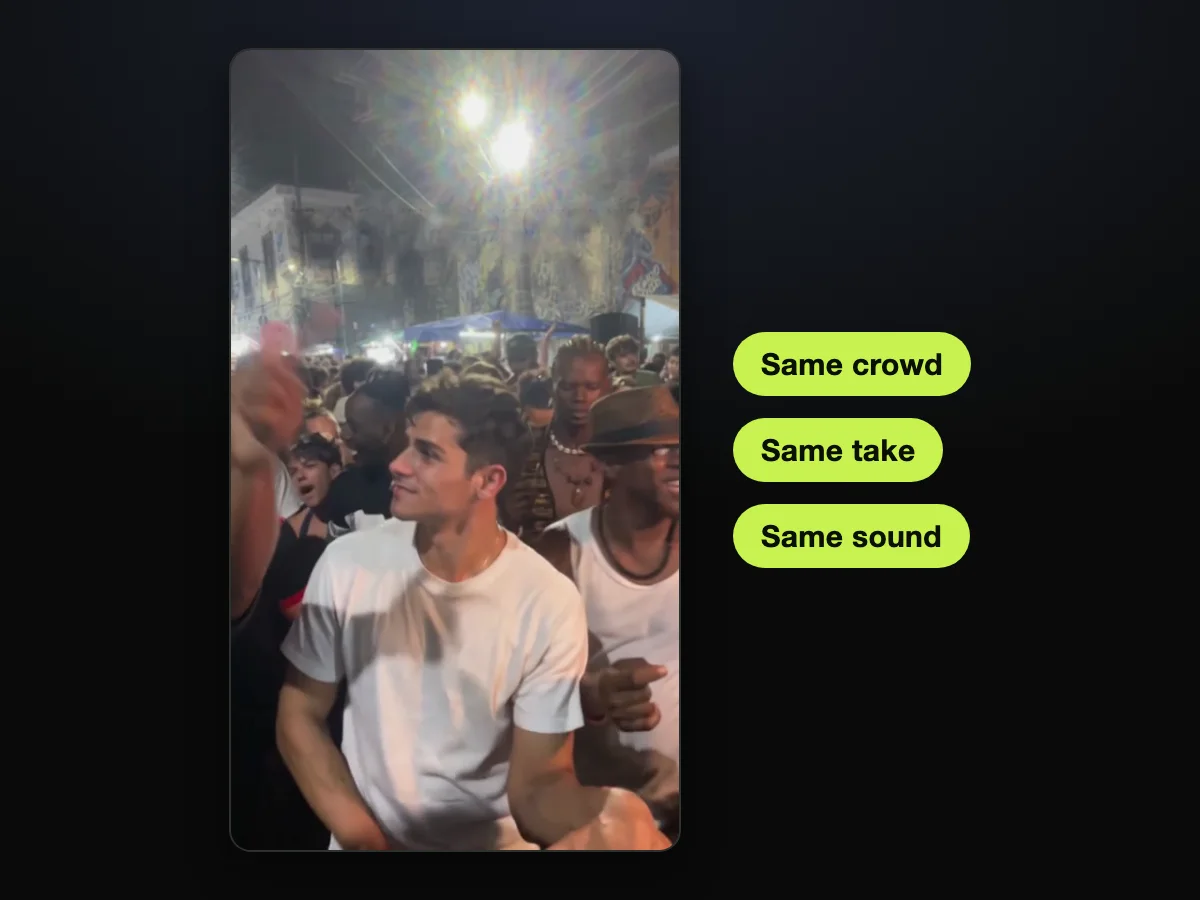
You'll see the man from the photo dancing in the crowd. The tags show that the crowd, the take and the sound are the clip's own.
Skip the Prompt: One Photo on Charme Dance AI
Charme Dance AI makes the same video from 1 photo. That's because the Seu Zé clip's first 15 seconds, its own audio and these 187 words are already built into our maker.
How do you get AI to make you dance, or do the viral TikTok AI dance without opening an editing suite? You don't edit anything. You just upload your picture:
- Upload photo: you pick a photo of you, a grandparent or parent, or a friend, each 18 or older. A cartoon or game character, or an AI-made one, works too. Then you tick "I have the right to use this photo, and any person in it is 18 or older."
- 480p, 720p or 1080p: 480p is picked when the page opens, and you can switch to 720p or 1080p.
- Create · $9.90: you press the button to run the prompt, and the price is right on it before you pay.

This screenshot of our live maker shows the photo in the box, the tick, 720p picked, the chip reading "15s · 9:16" and the button reading "Create · $9.90".
You'll download an unwatermarked 15-second MP4 in 9:16 (a tall, upright frame made for TikTok and Reels) with the clip's own audio already synced.
You can check out as a guest without creating an account: "No account needed: pay once and your video starts right here."
The email you enter gets your receipt, and its link opens your videos on any device. Your render is saved and resumes right after checkout.
One 15-second 720p video costs $9.90, which buys a 500-credit pack with no recurring fees. A 480p video uses 375 credits, so the same pack covers it, and you can view every credit pack to see other options.
For finished videos ready to share, make Charme Dance AI Videos for TikTok and Reels right in your browser.
If you'd like a step-by-step walkthrough of the interface, read our guide on how to make a charme dance AI video.
What You Need Before You Paste the Charme Dance AI Prompt
Running the charme dance AI prompt yourself takes 4 things:
- An edit tool: you need an AI video editor that takes a clip to change, a reference photo and a prompt box.
- The clip: you need the opening 15 seconds of the 27-second clip @seuzerj posted on October 16, 2026, in 9:16, with the yellow caption taken out.
- Your photo: it's a single clear picture you attach as @Image 1.
- The clip's own audio: it's the party's music and crowd sound from the Seu Zé clip.
Once you've got those four ready, here's the order:
- Load the 15-second clip into your editor as the source video.
- Attach your photo as @Image 1.
- Paste all 187 words into the prompt box, and don't change them.
- Pick 9:16 if your editor asks for a shape.
- Lay the clip's own audio under the edited video from the very first second.
Because the charme dance AI maker already holds the edit tool, the clip and its audio, your photo is all you bring.
Charme Dance AI Prompt Mistakes to Avoid
Seven mistakes are easy to make when you run the charme dance AI prompt on your own. Each one has a fix in the real prompt or the right setup.
Don't Swap His Description for a Name
The real prompt never uses the name Seu Zé. It describes his white afro, glasses, moustache, red shirt, suspenders and waist bag, plus where he dances, so it's clear which dancer goes.
Don't Write Out the Charme Steps
Charme is a street dance that began in Brazil in the early 1980s, with smooth side steps, bouncing shoulders and loose hands.
Don't write those moves into the prompt: keep "every dance step and movement, the timing" so the editor copies the routine directly from the clip.
Don't Trim the Keep List to Save Words
The keep list and its no-text line take 70 of the 187 words, so more than a third of the prompt is about what shouldn't change.
Each of those 11 items is there so it stays exactly as the clip shows it. That goes for the men around the lead, and for the blue tents and floodlights too.
Don't Use the Clip With Its Caption Still On
The original clip has a yellow Portuguese caption burned in across the picture, and our maker uses the first 15 seconds with it taken out. Use a clean version of the first 15 seconds that has no text on the screen, just like ours.
Don't Pick a Group Shot or a Far-Away Face
Follow our maker's own photo hint: "One person or one character per photo, face clear, facing the camera, in good light. Full body works best."
You can use a photo of yourself, a parent, a grandparent or a friend, each 18 or older. A cartoon, game or AI-made character works too.
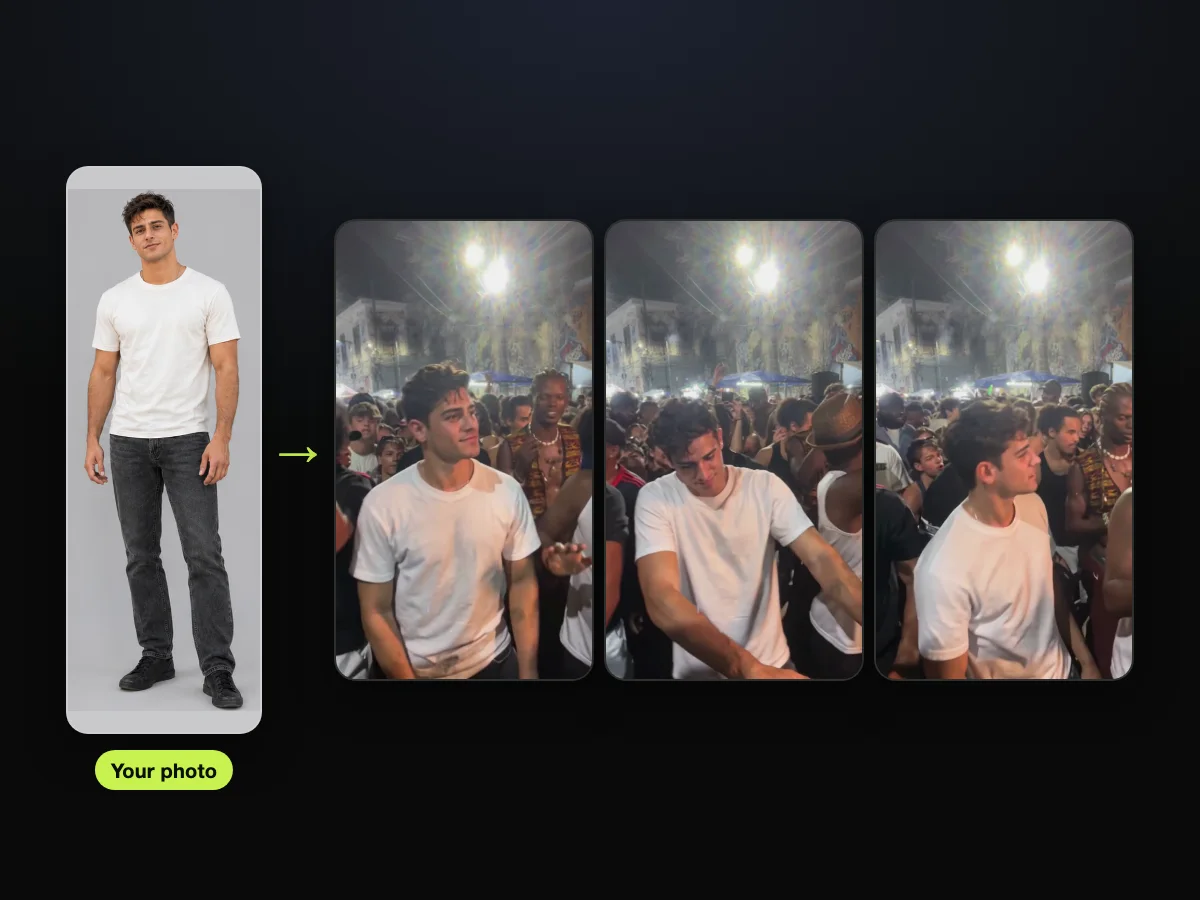
You'll see one person, full body, facing the camera, and that same person dancing in the crowd across three frames.
Don't Paste It Into a Photo-to-Video Tool
The charme dance AI prompt is an edit prompt (written instructions that change a video you already have, instead of describing a new one).
A photo-to-video generator has no base clip to work from. So what it makes is a new video with a different party, not the Seu Zé de Madureira clip.
Our charme dance AI generators compared review shows which tools keep the clip and which build a new party.
Don't Forget the Clip's Own Audio
The 187-word prompt changes only the picture, so the sound is a separate step. Lay the clip's own audio under the new video from the first second to keep the music and crowd noise.
When you create a baile charme AI video through our maker, the clip, caption removal, 187-word prompt and original audio are already sorted for you. So your photo is the only thing you pick.
Charme Dance AI Prompt: Your Questions
What does @Image 1 mean in the charme dance AI prompt?
@Image 1 is the tag pointing to the first image you attach, which is your reference photo. The prompt tells the editor to take the lead dancer's face, hair, body and outfit from @Image 1. The Seu Zé clip itself is the video being edited.
Why doesn't the prompt name Seu Zé?
Seu Zé de Madureira isn't a public figure or an actor: he's an AI-made character. The TikTok caption on the @seuzerj post itself reads "Ninguém botou fé no vovô no baile charme" ("nobody had faith in grandpa at the baile charme" in Portuguese).
The prompt points at him by what you can see instead, like his red shirt and white afro, and by where he dances.
Will the prompt keep my own outfit?
Yes, it's right there in the prompt: "their face, hair, body and whole outfit come from @Image 1 only".
The first AI remakes went up on October 13, 2026. They put 80s action-movie heroes in the same kind of floodlit Rio square, with Van Damme among them in a denim shirt. The TikTok hashtag #vandammebailando counted 2,054 videos and 9.1 million views on October 20, 2026.
If you wear an 80s action outfit in your photo, that outfit stays on you in the dance.
Why does the prompt list the man in the brown hat?
The man in the brown hat dances right next to the lead dancer from around the 4-second mark. He's beside him during the signature lean-in move, too.
Naming the man in the brown hat and white tank top keeps his face and routine untouched while the lead dancer swaps out.
What are some good prompts for dancing?
If you're wondering how to make an AI dance video prompt for this trend, the best prompt is an edit instruction rather than a descriptive prompt. Use the three prompt moves shown here:
- Who goes out: point to the lead dancer by what they wear.
- Who comes in: name @Image 1 for the new dancer's full look.
- What stays: lock every background element and dance step.
That's the whole recipe behind this charme dance AI prompt for TikTok.
Let the Charme Dance AI Maker Handle the Prompt
The charme dance AI prompt spends 187 words on one change to the first 15 seconds of the Seu Zé de Madureira clip: a new lead dancer. Our maker runs it for you, automatically.
To make yours, upload 1 photo to Charme Dance AI, choose 720p and press Create. It's $9.90.
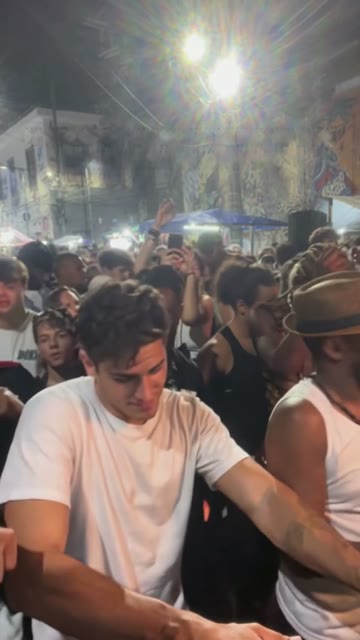
You're looking at the Lean in moment of the edit. The man from the photo leans forward with his hands low, beside the guy in the brown hat and white tank top.
Related Articles
- How to Make a Charme Dance AI Video (Even If You Never Dance) — one photo, three taps, and the 15 seconds you get back.
- What Is the Charme Dance AI Trend? The Grandpa Joke, Explained — the AI grandpa nobody had faith in, the Rio square and the remakes that followed.
- Charme Dance CapCut Template Not Working? 6 Fixes to Try — what goes wrong with the template the tutorials link, and what to do about it.
- Charme Dance AI Generators Compared: 10 Tools Checked (2026) — which tools keep the viral clip and which build a new party around you.


